
Crest
Your notch just
got a job.
A developer toolbox in your notch.
Coding agents, 2FA codes, files, music.
In the official Homebrew cask



The short version.


All three apps for $24.99 once, or $2.99 a month. Compare the plans
Never miss the ask.
Open the ask. The whole command, then Allow.
Claude has a question? Tap the answer.


3coding agents, answered from the notch.
12window layouts. Drag a window up to the notch.
7daysof Pro, free. No card.
2Macson every licence.
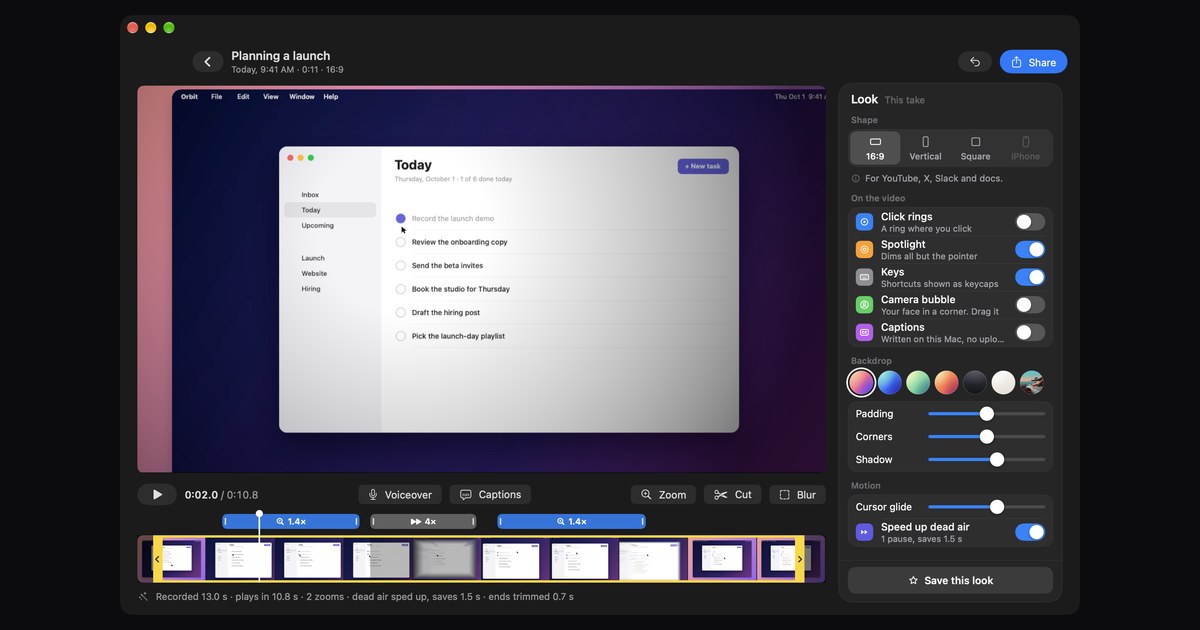
Two more apps.
Both run from the notch.

Minutes
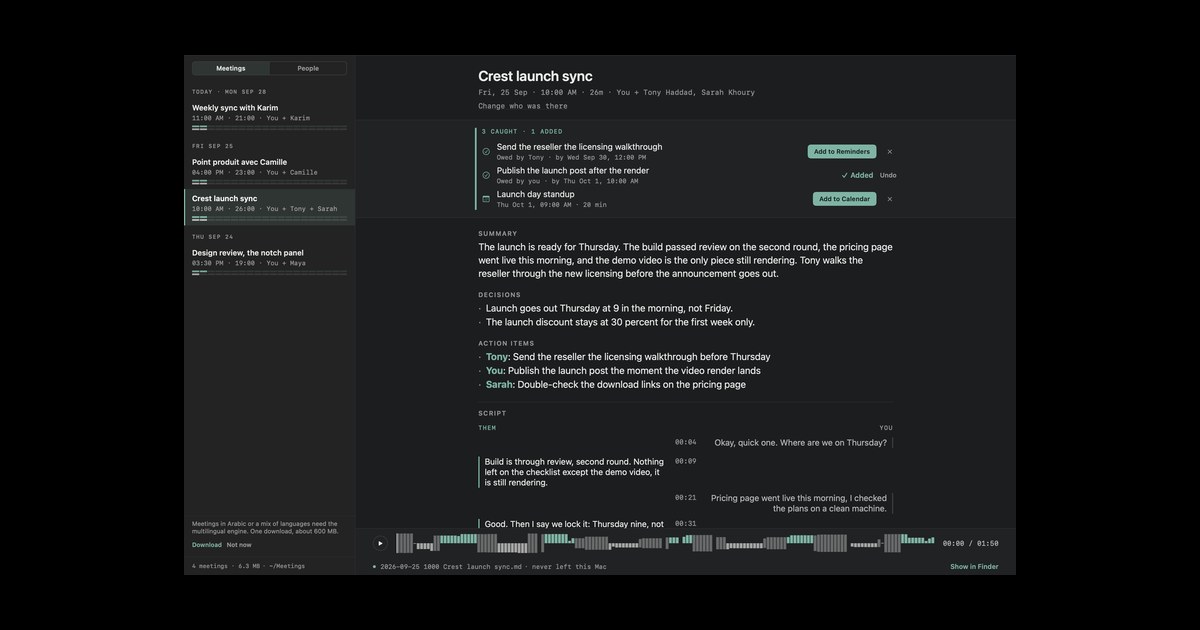
Meeting notes written on your Mac. Nothing leaves it. macOS 26, Apple Silicon.
What people say.
From people who use the apps. We read each one before it goes up.
4.9 / 5 · 12 reviews
★★★★★
Esuna app super fluida y muy bonita!
★★★★★
This is the most complete solution I've ever seen for the Notch "problem."
You made a great app. I love how I can separate work and home spaces, creating a clear distinction between the two. I haven't found anything else bothersome, and I love how you update it regularly.
★★★★★
it has helped me a lot with keeping up with my calendar and keeping my screenshots for easy access
★★★★★
Best MacBook notch application I've found.
★★★★★
Was first drawn to Crest. I have tried 426 different "notch apps" and Crest is the one I have enjoyed using the best. With the integration into Crest that Minutes and Take has, I have one pane of glass into 3 productivity apps that I use all the time. Zack is responsive and gracious when I bombard him with questions.
★★★★★
great app! worth every penny
★★★★★
Simply, a productivity companion
Crest primarily got my attention due to its Claude Code integration, Take and Minutes I primarily use for meetings and planning!
I like the aesthetic, I mainly use for media control and AI development. Claude works great in it!
★★★★★
It's amazing, gives useful information on the notch and stays out of my way also.
★★★★☆
doesnt work perfectly on my notch, the area detection is quite poor
Buy once or subscribe.
Every paid plan is Crest Pro, Take and Minutes.
No account needed
Crest
Free
- Now Playing with synced lyrics
- The Shelf and the Clipboard
- Window snapping
- Take and Minutes controls
- Answers for your coding agents
Then sign in inside Crest for 7 days of Pro, no card.
Also on Homebrew:
Pay once, no renewals
Buy once
$24.99 once
- Everything in Free, plus:
- A warning before your Claude or Codex limit runs out
- The Agents widget: every session, one click away
- Calendar with Join, Notes, Weather and every Pro widget
- The Authenticator: two-factor codes in the notch, typed in for you
- Take and Minutes included
- Two Macs each, yours for good, updates through Crest 7
- Own Crest Pro already? Add Take and Minutes for $5
One payment, tax included. Crest and Take need macOS 14 or later, Minutes macOS 26 or later on Apple Silicon. Refunds within 7 days.
Cancel any time
Subscribe
$2.99 a month
or $14.99 a year
- The same Pro widgets, Take and Minutes
- Two Macs for each app
- Every update while you subscribe
- Stop any time: Crest goes back to free and keeps your setup
Renews until you cancel, tax included. Cancel any time from your account. Crest and Take need macOS 14 or later, Minutes macOS 26 or later on Apple Silicon. Refunds within 7 days of a payment.
Buy once and it is yours, offline too. A subscription runs while it is paid.
Already own Crest? Nothing changes for you.
★★★★★ “…I have one pane of glass into 3 productivity apps that I use all the time.” SteveB, verified buyer
For a team
Crest Pro, Take and Minutes for each person, on their own email and 2 Macs. One payment, and you hand out the seats.
Two Macs per licence.Prices in USD, tax included.7-day refunds.Card, PayPal, Apple Pay, Google Pay or crypto.
The details, if you want them.
Crest against the other notch apps
Every claim below comes from the other apps' own sites (NotchNook's checked 9 October 2026). Where they win, it says so.
| Feature | Crest | The Boring Notch | NotchNook | Alcove |
|---|---|---|---|---|
| Price | $24.99 once with Take and Minutes, or $2.99 a month | Free, open source | $25 once or $3 a month | $14.99 once |
| Try it | Free tier with no time limit, plus 7 days of Pro | Everything is free | 48-hour trial | 72-hour trial |
| Agent approvals | Claude Code, Codex and Copilot CLI, in the notch | No | No | No |
| Claude co-pilot | Files reminders, todos and events, on your approval | No | No | No |
| Meetings and todos | Calendar with one-click Join, to-dos, notes, a focus timer | Calendar | Widgets and a tray | Notifications and Live Activities |
| Developer tools | GitHub PRs and CI, SSH hosts, live agent sessions | None | None | None |
| Opens like a Mac app | Signed and notarized | Needs a Gatekeeper bypass | Signed | Signed |
| On battery | Animations pause, sleeps with the Mac | Low CPU on Apple Silicon | User reports of high CPU at times | Not stated |
| Macs per licence | Two | Unlimited | Two | Three |
Full comparisons: Boring Notch, NotchNook, Alcove, Perch, TopNotch, MediaMate, Notchmeister, all three apps, feature by feature
Questions
- Do I have to subscribe?
- No. Buy all three apps once for $24.99, with updates through Crest 7, or subscribe for $2.99 a month or $14.99 a year and get every update while you subscribe. A one-time licence works offline and is never switched off, unless the payment is refunded or charged back. A subscription runs while it is paid, with 30 days of grace offline.
- What do I get after paying?
- An account on the email you paid with, and a link in your inbox to set a password. Sign in inside the app and it unlocks. There are no licence keys to paste, and the licence covers two Macs.
- Can I try before buying?
- All of it. Crest has a free tier plus seven days of Pro, the Authenticator included, and Take and Minutes each start with a seven-day trial. No card up front for any of them. Downloading needs no account: you sign in inside the app when you start a trial, because the account is how you get what you buy later.
- Do I need an account?
- Not to download, and not for Crest's free tier. You sign in only to start a free trial or when you buy, because your licence lives on your email and signing in inside the app is what unlocks it. A purchase makes the account for you, on the email you pay with.
- Does it really work offline?
- Yes. You need internet once, to activate. After that every feature runs offline. A subscription checks in now and then, and keeps working offline for 30 days of grace. Minutes never sends audio or text anywhere, online or not: transcription and summaries run on the models inside macOS.
- Which Macs do I need?
- Crest runs on any Mac on macOS 14 or later. On a MacBook with a notch it lives in the notch; on any other screen it sits in a small pill at the top and opens the same panel. Take runs on any Mac on macOS 14 or later. Minutes needs macOS 26 or later on Apple Silicon, because its transcription and summaries run on device.
- I don't have a notch. Is any of this for me?
- Yes, all three. Crest shows a small pill at the top of a screen without a notch and opens the same panel from it. Take runs on any Mac on macOS 14 or later, and Minutes on any Apple Silicon Mac on macOS 26.
- I already own Crest Pro. What changes?
- Nothing. Your licence keeps working forever, with free updates for life, and nobody will ask you to subscribe. Sign in with the email you bought with and it appears in your account next to anything new you pick up.
- Can I install Crest with Homebrew?
- Yes. Crest is in the official Homebrew cask, so brew install --cask crest in Terminal installs it. After that Crest updates itself, the same as a copy from the download button.
- What if I do not like it?
- Try it before you pay. Crest has a free tier that never expires and needs no account, and signing in gives you seven days of Pro with no card. Take and Minutes have the same seven day trial. If you have already bought and something is wrong, write to contact@crestnotch.app and we will sort it out. More questions on the support page.
Tech specs
- Crest
- macOS 14 Sonoma or later, on any Mac. On a MacBook with a notch it lives in the notch; on any other screen, a small pill at the top opens the same panel.
- Take
- macOS 14 or later, on any Mac.
- Minutes
- macOS 26 or later on Apple Silicon: transcription and summaries run on device.
- Coding agents
- Claude Code, Codex and GitHub Copilot CLI.
- Authenticator
- In Crest Pro: two-factor codes in the notch, typed in for you when a site asks in Safari, Chrome, Arc, Brave or Edge, and one press from any app. Encrypted behind Touch ID. How the Authenticator works
- Licence
- Buy once for updates through Crest 7, or subscribe for every update while it runs. Two Macs per licence. Works offline after one online activation.
- Paying
- Card, PayPal, Apple Pay and Google Pay through Paddle, or crypto through NOWPayments. Refunds within 7 days.