Crest
The notch, put to work.
A real control panel in your MacBook's notch.
It never takes focus, and never steals a click.
In the official Homebrew cask
★★★★★ “This is the most complete solution I’ve ever seen for the Notch ‘problem.’” Brett, verified buyer
Crest is a Mac notch app that puts music, your calendar, notes, files and your coding agents in pages of widgets under the notch. Answering Claude Code, Codex and Copilot CLI prompts is free, in a free tier that never expires; Pro, with Take and Minutes, is $24.99 once or $2.99 a month, free for 7 days with no card.



Music, the weather, your calendar and batteries.
Everything it can be.
Nineteen widgets, in sizes you stretch. Three are free, and the Take and Minutes ones need only those apps.
Authenticator: two-factor codes in the notch. In Crest Pro, one press from any app, synced across your Macs, end-to-end encrypted. Free users can try it for 7 days. How it works
Your agents wait in the notch.
Claude Code, Codex and Copilot CLI ask here. You answer without leaving what you're doing, free.


The whole command, and Allow or Deny. The ask stays until you answer.
All three apps for $24.99 once, or $2.99 a month. Compare the plans
Your next call, one click away.
Join from the notch. Check your camera and mic first.
Record it with Minutes
Drag a window up. Drop it in place.
Hold it at the notch and pick one of twelve layouts. Free, with no account.
Always there. Never in the way.
No notch? Crest sits in a small pill at the top of any screen.
What Crest users say.
We read each one before it goes up.
4.9 / 5 · 12 reviews
Esuna app super fluida y muy bonita!
This is the most complete solution I've ever seen for the Notch "problem."
You made a great app. I love how I can separate work and home spaces, creating a clear distinction between the two. I haven't found anything else bothersome, and I love how you update it regularly.
it has helped me a lot with keeping up with my calendar and keeping my screenshots for easy access
Best MacBook notch application I've found.
Was first drawn to Crest. I have tried 426 different "notch apps" and Crest is the one I have enjoyed using the best. With the integration into Crest that Minutes and Take has, I have one pane of glass into 3 productivity apps that I use all the time. Zack is responsive and gracious when I bombard him with questions.
great app! worth every penny
Simply, a productivity companion
Crest primarily got my attention due to its Claude Code integration, Take and Minutes I primarily use for meetings and planning!
I like the aesthetic, I mainly use for media control and AI development. Claude works great in it!
It's amazing, gives useful information on the notch and stays out of my way also.
doesnt work perfectly on my notch, the area detection is quite poor
A free tier that never expires. Pro once, or by the month.
Pro comes with Take and Minutes either way.
Crest
- Now Playing with synced lyrics
- The Shelf and the Clipboard
- Window snapping
- Take and Minutes controls
- Answers for your coding agents
Then sign in inside Crest for 7 days of Pro, no card.
Also on Homebrew:
Buy once
- Everything in Free, plus:
- A warning before your Claude or Codex limit runs out
- The Agents widget: every session, one click away
- Calendar with Join, Notes, Weather and every Pro widget
- The Authenticator: two-factor codes in the notch, typed in for you
- Take and Minutes included
- Two Macs each, yours for good, updates through Crest 7
- Own Crest Pro already? Add Take and Minutes for $5
One payment, tax included. Crest and Take need macOS 14 or later, Minutes macOS 26 or later on Apple Silicon. Refunds within 7 days.
Subscribe
or $14.99 a year
- The same Pro widgets, Take and Minutes
- Two Macs for each app
- Every update while you subscribe
- Stop any time: Crest goes back to free and keeps your setup
Renews until you cancel, tax included. Cancel any time from your account. Crest and Take need macOS 14 or later, Minutes macOS 26 or later on Apple Silicon. Refunds within 7 days of a payment.
Buy once and it is yours, offline too. A subscription runs while it is paid.
Already own Crest? Nothing changes for you.
For a team
Crest Pro, Take and Minutes for each person, on their own email and 2 Macs. One payment, and you hand out the seats.
Two Macs per licence.Prices in USD, tax included.7-day refunds.Card, PayPal, Apple Pay, Google Pay or crypto.Everything you own lives at your account.
The details, if you want them.
Crest against the other notch apps
There are good notch apps. What none of them do is answer your coding agent, keep your servers a tap away, and drive two other apps from the same panel.
| Feature | Crest | Boring Notch | NotchNook |
|---|---|---|---|
| Claude Code, Codex and Copilot CLI approvals, and Claude's questions, answered in the notch | Yes | No | No |
| An AI co-pilot that can create events and todos | Yes | No | No |
| SSH hosts, yours and the ones in ~/.ssh/config, that open in your terminal | Yes | No | No |
| Drives a screen recorder and a meeting notetaker | Yes | No | No |
| Now Playing with synced lyrics | Yes | Playback, no lyrics | Playback, no lyrics |
| Free tier that keeps working | Yes | Open source | No, a 48-hour trial |
| One-time purchase | Yes | Free | Yes: $25 once or $3 a month |
Published by the makers of Crest, from each app’s own public pages, checked 30 September 2026, NotchNook’s on 9 October 2026. Competitor names are the property of their owners. The longer Boring Notch comparison, vs NotchNook, vs Alcove, vs TopNotch, vs Perch, vs Notchmeister, vs MediaMate, NotchNook alternatives, Best Mac notch apps in 2026.
Questions
- Do I need a MacBook with a notch?
- No. Crest was designed around the notch, and on a MacBook that has one it lives inside it. On any other Mac, or on a display without a notch, it sits in a small pill at the top of the screen: hover it for the peek, click it for the same panel.
- Do I need an account?
- Not to download it and not for the free tier. You sign in, with Google, Apple or an email, when you want the free Pro week or when you buy, because that is where your licence lives.
- Will it eat my battery?
- No. Other notch apps have a reputation for always-on animation. Crest pauses its animations on battery and in Low Power Mode, and sleeps its monitors when your Mac sleeps.
- Does anything leave my Mac?
- Every widget runs locally and nothing tracks you. The only count is an anonymous install id sent with update checks, and you can turn it off. Crest goes online to sign you in, check the licence and look for updates. Weather, lyrics and pull requests come straight from their source, and the Claude widget goes through your own Claude account. None of it passes through us. The full list is on the privacy page.
- Does Crest snap windows?
- Yes, and it is free. Drag any window up to the notch and hold, and a palette of twelve layouts opens: halves, quarters, thirds, centre and full screen. Release on one and the window lands there. Crest moves other apps' windows through macOS Accessibility, which it asks for on your first drag, never at launch.
- Can I check my camera and mic before a call?
- Yes, in Pro. Before a call, the Camera check opens from the notch: your picture, your mic level, and a choice of which camera and which mic. A virtual camera such as OBS is never picked for you. The camera and the mic are on only while the card is open.
- How do updates work?
- Crest checks by itself and can install in place, and Settings has a Check for updates button. Bought before? Every update stays free for life. A new one-time licence includes updates through Crest 7, and a subscription includes every update while it runs.
- Can I install Crest with Homebrew?
- Yes. Crest is in the official Homebrew cask, so brew install --cask crest in Terminal installs it. After that Crest updates itself, the same as a copy from the download button.
- What happens when the trial ends?
- The free tier keeps working, forever, with nothing deleted. Anything you made in a Pro widget is still there and comes straight back if you buy.
Coding agents, in detail
- Allow or Deny in one click
- The ask opens under the notch with the whole thing on it: the full command, or the file and the lines it changes. You answer at the top of the screen and the agent carries on. The prompt stays until you answer, because a missed approval is an agent sitting still. Answering is free, with no account.
- Answer its questions
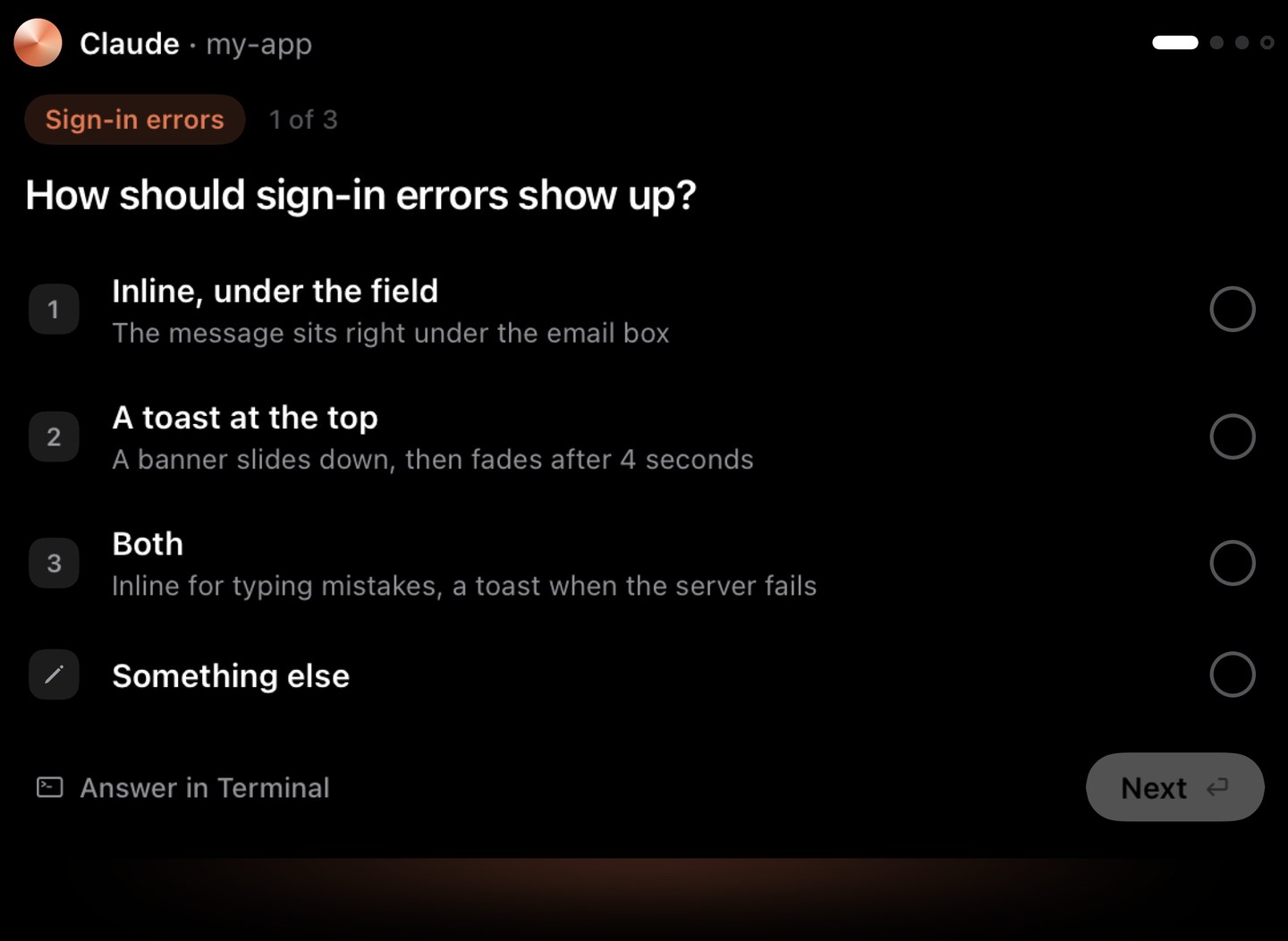
- When Claude Code asks you to choose, the options are right on the notch. A single choice answers in one tap. Several questions come one card at a time, and you check your answers before they go. Crest types your answer into the terminal for you (macOS asks once for Accessibility). See the question on the closed notch and the card, open.
- Or answer in your own words
- None of the options fit? Type something opens a field on the card, and what you write goes into the session as your answer, exactly as the terminal's own picker would take it. Works on single-choice questions.
- Allow the rest of a session
- Turn on "Allow the rest of this session" on the allow sheet, and that session's permission prompts are allowed for you until it ends. Questions still come to you, because those are real decisions.
- Back to the terminal in one click
- With Crest Pro, every Claude Code, Codex and Copilot session sits in the Agents widget with what it is doing. One click brings its terminal forward, down to the exact tab in iTerm2 and Terminal, and the pane in tmux.
- A co-pilot that can act
- Ask Claude or dictate. When it suggests reminders, to-dos or events, it lays them out as a plan: tick what you want and press Do it. Nothing runs before that. Uses your Claude subscription, no API key.

What's new in Crest 6
- One shape, from the notch
- Crest grows out of the notch and settles back on real springs, whatever it is showing.
- Music on the closed notch
- In the style you pick: bubbles with the album art and an equaliser that moves while music plays, or wings inside the notch.
- Pages instead of tabs
- Now, Home, Work and Code. Swipe with two fingers to move between them, and fill each one with widgets you stretch from small to wide.
- One card for every ask
- Claude Code, Codex and Copilot questions arrive as one card on the notch: pick an answer, type your own, or allow and deny a command, without leaving what you are doing.
- Notes, to-dos and a clipboard
- Notes, to-dos with due dates you just type, your calendar, the Shelf and a new clipboard history, all as widgets and full screens.
- Volume and snapping
- Scroll on the notch to change the volume, and hold a window at the notch to snap it into one of 12 layouts.
- Settings and a first run
- A new Settings window you can search, and a short first run that builds your Home from what you use.
A free update for everyone who has Crest. See Crest 6 in pictures, or read the changelog for every release.
Tech specs
- Works on
- macOS 14 Sonoma or later, on any Mac. In the notch on a MacBook that has one; a small pill at the top of any other screen.
- Free
- Now Playing with synced lyrics, the Shelf, the Clipboard, window snapping, answering your coding agents, and the Take and Minutes widgets (they need those apps). No account, no expiry.
- Pro
- The other fourteen widgets, the Agents widget and the Authenticator among them, with Take and Minutes. $24.99 once with updates through Crest 7, or $2.99 a month with every update. Two Macs.
- Coding agents
- Claude Code, Codex and GitHub Copilot CLI, through their own hooks.
- Authenticator
- In Crest Pro. Your two-factor codes in the notch, typed in when a site asks in Safari, Chrome, Arc, Brave or Edge, and one press from any app. Mac only, no iPhone app. Moving from Google Authenticator, leaving Authy, or how it compares.
- Install
- Signed and notarized by Apple. Homebrew user?
brew install --cask crest